
pro Export
DOCX export — native .docx from markdown, no Pandoc
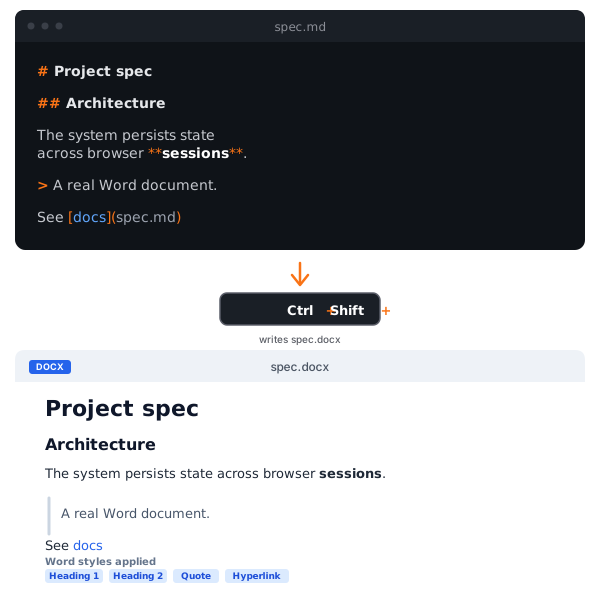
Press Ctrl+Shift+W. A real Word document, written by a native Rust OOXML emitter. Opens cleanly in Word, LibreOffice, Google Docs, and Apple Pages.
What it does
Press Ctrl+Shift+W (or pick File → Export as Word…) and MD View writes a real Word .docx file. The output is a proper OOXML zip — headings carry Word’s built-in Heading1–Heading6 styles, tables render as <w:tbl> with borders, hyperlinks are clickable, images are embedded under word/media/. No Pandoc, no shelling out, no PATH config.
Why it exists
Sharing a markdown read with someone who lives in Word — a non-technical reviewer, a legal team, a recipient on a track-changes pipeline — used to mean either “screenshot the rendered preview” (lossy), “send the raw .md and hope” (frustrating), or “install Pandoc and learn its CLI” (overkill). MD View collapses all three into a menu item plus a keyboard shortcut.
There’s a second use pattern: the Pro tier wires the export into the app, so you don’t have to remember an external tool’s command line. One keystroke, save dialog, done.
Under the hood
The frontend walks the markdown-it token stream into a typed AST (blocks + runs + hyperlinks + image references). The Rust side deserializes the AST and emits OOXML XML strings, then assembles a real .docx zip with [Content_Types].xml, _rels/.rels, word/document.xml, word/styles.xml, word/_rels/document.xml.rels, and any word/media/imageN.{ext} parts. JavaScript owns markdown semantics; Rust owns OOXML syntax.
The architectural choice — emit OOXML directly rather than using a library like dolanmiu/docx (~250 KB JS) or AltChunk (HTML-in-DOCX, which renders blank in LibreOffice and Google Docs) — keeps the export small, predictable, and dogfoodable in LibreOffice (the primary developer’s editor).
What translates natively
Headings (H1–H6), paragraphs, bold and italic, inline code, hyperlinks, code blocks, bullet and numbered lists with nesting, GFM tables (with shaded header row), images (PNG/JPEG/GIF/SVG, sized via the live DOM’s natural dimensions and scaled to page text width if needed), blockquotes, horizontal rules, soft and hard line breaks. Output uses US Letter page size with 1-inch margins.
Visible-fallback policy
The exporter never silently drops content. Every Markdown construct either renders natively or emits a visible fallback that preserves the source. Mermaid diagrams render as code blocks with the diagram source. Inline math becomes inline code with the LaTeX source. GitHub / Obsidian alerts become blockquotes with the label as a bold first run. Task list checkboxes use Unicode ☐ / ☑. Footnote refs become [N] plain text with a separator and definitions section after the body.
Use cases
- RFC review: export a spec to .docx, share with a reviewer who prefers Word’s track-changes.
- Legal sign-off: legal teams almost universally live in Word; meet them where they are.
- Document management systems: SharePoint, Box, and other DMS are .docx-first; export once, drop it in.
- Print-quality output: Word’s print rendering is more reliable than browser print stylesheets for some templates.
For pixel-perfect typography, use PDF export instead. DOCX prioritizes editability and compatibility; PDF prioritizes layout fidelity.
Frequently asked questions
- Does this use Pandoc?
- No. MD View ships a native OOXML emitter written in Rust. The `.docx` file is assembled inside the app — no shelling out, no external dependency, no PATH config. The output uses Word's built-in style IDs (Heading1–6, Quote, HTMLPreformatted, Hyperlink) so it opens cleanly without warnings in Microsoft Word, LibreOffice Writer, Google Docs, and Apple Pages.
- What about Mermaid diagrams and math?
- Both follow a visible-fallback policy: Mermaid renders as a code block with the diagram source, and math renders as inline code or a code block with the LaTeX source. The exporter never silently drops content. Native PNG-rasterized Mermaid and OMML equation rendering are tracked v2 candidates.
- Are numbered lists Word-native (auto-renumbering)?
- No. Lists use visual `•` or `1.` prefixes plus indentation. Editing a list in Word won't auto-renumber. Native `numbering.xml` would add complexity for marginal benefit at the v1 scope; it's a known limitation.
- Can I use a reference-doc / template for company branding?
- Not in v1. The exporter writes only built-in style IDs — no equivalent of Pandoc's `--reference-doc` flag. If you need company-branded output today, edit the exported .docx in Word and apply your template after.
MD View — free, lifetime $24
14-day Pro trial. Then keep every Free feature forever.